Did you know that 45% of software projects are over budget while delivering 56% less value? It’s not shocking considering that managing budgets in software development is one of the hardest operational battles a company can face. Clients want clarity: When will it launch? How much will it burn? What risks are hiding beneath that Jira board?
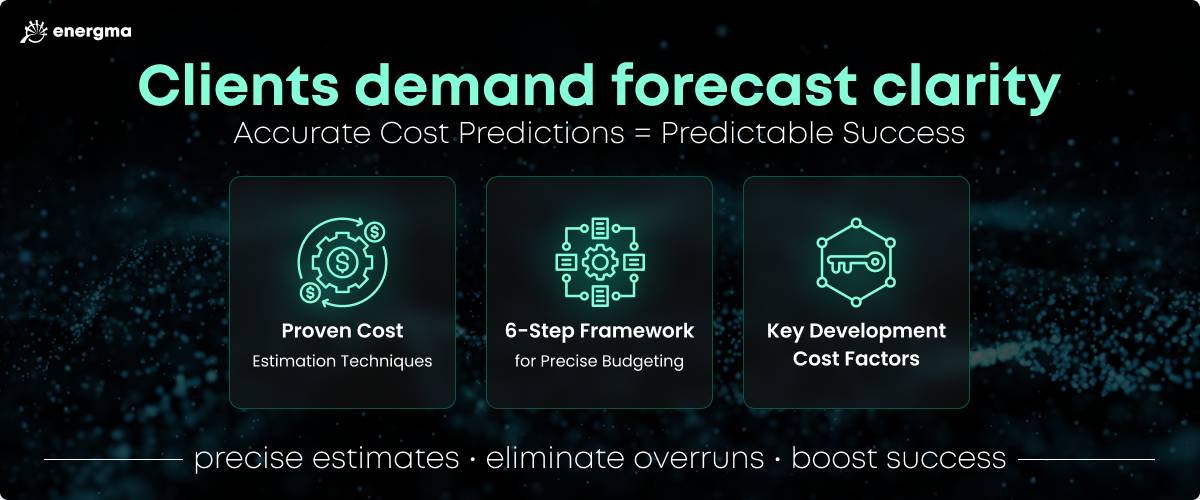
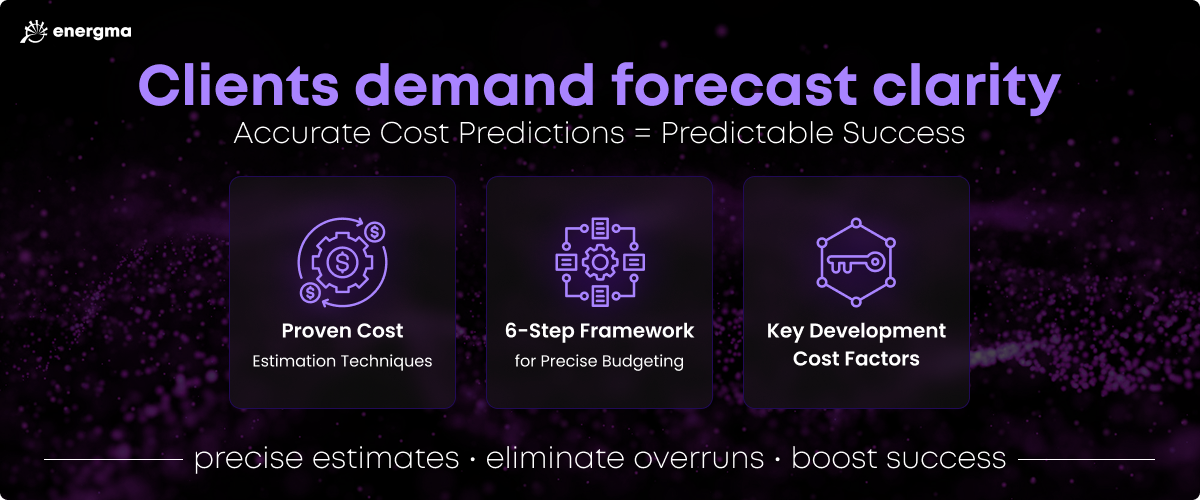
An accurate estimate ensures effective resource allocation, prevents budget overruns and keeps stakeholder expectations in check. In this guide we will walk you through:
● 3 proven software cost estimation techniques
● A 6-step framework for precise budgeting
● Key software development costs factors
Apply these insights and you’ll forecast with accuracy, eliminate overruns, and give your next project an edge built on predictability.
Nearly half of software projects go over budget and most deliver less value than planned due to poor estimation and unclear scope.
Accurate budgeting starts with the right estimation method, supported by a clear project brief and module map.
Break the project into smaller, manageable tasks. A Work Breakdown Structure (WBS) provides structure, while a Software Requirements Specification (SRS) builds shared understanding between teams and vendors.
Technology choices and hiring models directly impact cost, scalability, and long-term maintenance, which also must be budgeted from day one.
Region affects developer rates dramatically. The US can be three times more expensive than Asia. However, your decision should be based on value, not price alone.
Key Methods of Cost Estimation
When calculating software development budgets, accuracy depends on method. Four proven approaches dominate the field:
Each method has its unique strengths and blind spots. The real advantage comes from knowing which one fits with your project's complexity, timeline, and uncertainty. By understanding these, project managers can make informed decisions about their budget and timeline before developers even begin their work.
Parametric Cost Estimation
This technique leverages parameters like project size, complexity, team structure, and expected duration to generate cost estimates. It’s the go-to method for fast cost modeling when you need clarity now, not six weeks from now. However, the trade-off is clear: if your scope isn’t locked in, math will start lying to you.
Pros:
Generates rapid cost predictions
Great for comparison of different paths
Can provide precise estimates with a well-defined scope
Cons:
Oversimplifies complex or evolving projects
Accuracy depends heavily on a precise scope
Example:
A mobile app expected to take 800 hours at $50 per hour would land around $40,000 using a parametric model, assuming your scope holds.
Analogous Cost Estimation
This technique relies on historical data from similar projects to provide an estimate of a future project’s cost. Using historical data as a benchmark, adjustments are made to account for differences in complexity, size, or scope between the reference project and the new one. But if the past project isn’t truly comparable, this method can turn a solid plan into an illusion.
Pros:
Easy to perform with reliable historical data
Fast and doesn’t need detailed project plans
Benefits from real-world delivery insights
Cons:
Accuracy relies on how close the reference project really is
May require extra effort to gather past project data
Fails when team composition, tech stack, or scope drift from the benchmark
Example:
If a previous project cost $50,000 and the new one carries roughly 20% more complexity, the analogous estimate would be $60,000 if your baseline data actually reflects reality.
Bottom-up Cost Estimation
Bottom-up is a detailed method that analyzes tasks and activities, breaking the project into smaller components. After estimating each one and stacking the costs, you can see the total development cost taking shape. It’s flexible, detailed, and incredibly accurate, but it can be time-consuming. It is perfect for complex projects where a high degree of accuracy is required.
Pros:
Produces highly accurate estimates across all tasks
Flexible, allowing for varied levels of detail
Ideal for enterprise-level and long-term development
Cons:
Time-consuming and resource-heavy
Higher overall estimate due to cost “buffers” for each task
Overestimating buffers can quietly inflate the budget.
Example:
A project is broken down into tasks like database design ($5,000), API development ($10,000), and testing ($3,000). Adding these up results in a total estimated cost of $18,000.
6 Steps to Estimate Software Development Costs Accurately
Accurately estimating software development costs is essential to a project’s success. Without a sound financial plan, budgets expand fast and timelines slip. As discussed, there are several methods for estimating software development costs, and depending on the scope of your project, one approach may prove more suitable than another.
The process below combines the speed of parametric modeling with the depth of bottom-up estimation to help your team build a grounded, real-world cost breakdown for any project.
#1 Craft a Project Brief and High-Level Modules Map
Start with a clear, high-level view of what you’re building. If you don’t already have one, write a project brief that defines the software’s purpose, audience, and core functionality. This becomes the foundation for every technical and budget decision that follows.
Next, map the major modules and their dependencies. A high-level architecture of components and connections gives you visibility into scope, complexity, and potential integration points.
As you map out modules, account for:
Databases
Algorithms
User roles
User interface
Infrastructure
Feature-specific modules
Third-party integrations
Finally, trace dependencies between these modules, how they connect, overlap, and depend on one another both internally and with external systems. This is where hidden costs live, and catching them early keeps your estimate stable.
#2 Research and Select Technologies
Once you’ve mapped modules and dependencies, the next step is to research the technologies that are most suitable for your project. Validate each choice by weighing costs, open-source options, and long-term maintenance.
If you already have preferred or required technologies, work with your engineering team to conduct additional validation. A couple of hours now can save you weeks of refactors when the wrong stack starts showing its limits.
When selecting technologies, ask:
What technologies are required for your project?
Are there open-source or commercial components that fit better?
How quickly can you build your software solution with the technologies you’re considering?
As you research, think beyond features. Focus on how your chosen technologies interact and the trade-offs involved. There may also be certain limitations, such as the cost of hiring developers with the right skillset or the difficulty of integrating existing software.
Before running numbers, create a Software Requirements Specification (SRS) to define:
Product summary and scope
Intended audience
Assumptions and dependencies
Functional requirements (what the system is supposed to do)
Non-functional requirements (how the system should perform)
Acceptance criteria
The SRS ensures a shared understanding among the project team and stakeholders. It is also a valuable tool for external vendors, allowing them to create more precise estimates. By providing a complete and detailed SRS, vendors can identify the scope of the project and the potential costs involved.
#4 Create Low-Fidelity UI Wireframes
Sketching low-fidelity UI wireframes is an effective way to improve cost estimate accuracy with moderate time investment. They give your team an early visual of the interface, helping engineers translate your vision into measurable scope and a more predictable budget.
Wireframes reveal which features are complex, costly, or time-intensive to build. Bring your engineering team’s input early and adjust designs where needed. Every simplification here compounds into faster and cheaper builds.
While they’re a helpful tool to improve the accuracy of your cost estimate, there is a risk vendors may treat early wireframes as final blueprints. Clarify that these are directional, not definitive. They exist to guide, not constrain.
#5 Design High-Fidelity UI Prototype
To refine estimate accuracy, progress from low-fidelity wireframes to a high-fidelity UI prototype. This gives your team a realistic preview of the user experience, exposing design gaps and technical constraints early.
Leverage pre-built UI systems like Tailwind UI or shadcn UI. They’re visually stunning, highly customizable and built with React and Next.js, making them easy to implement and accelerate design.
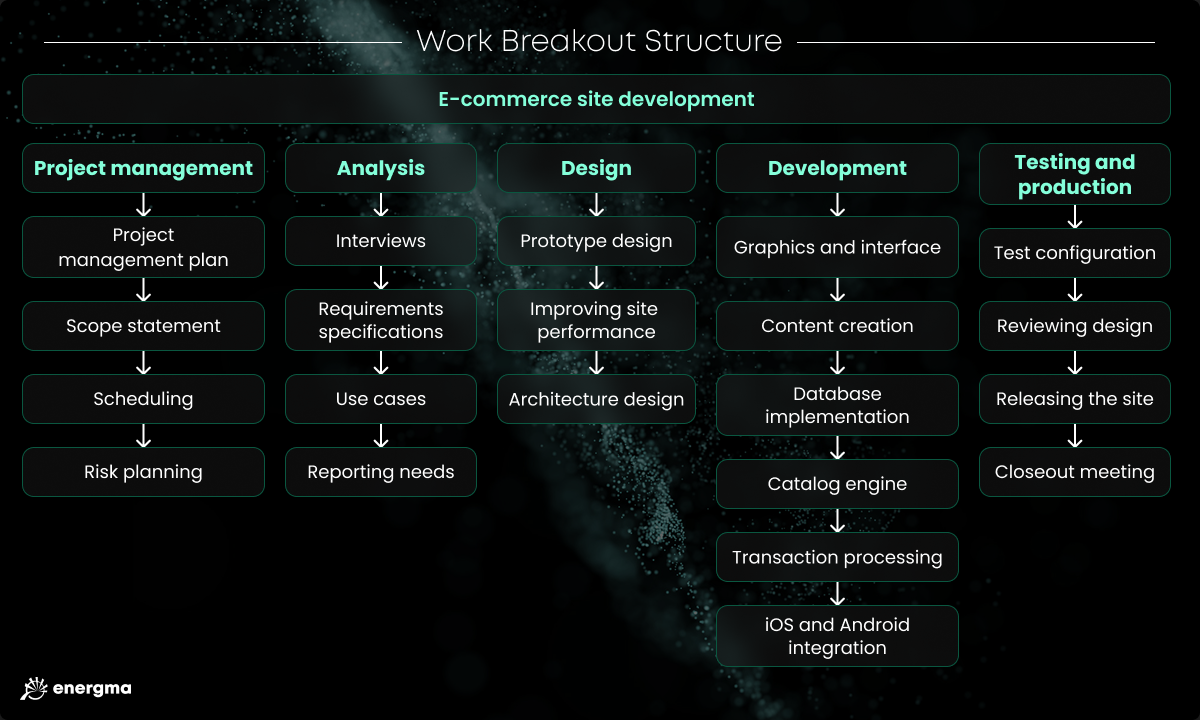
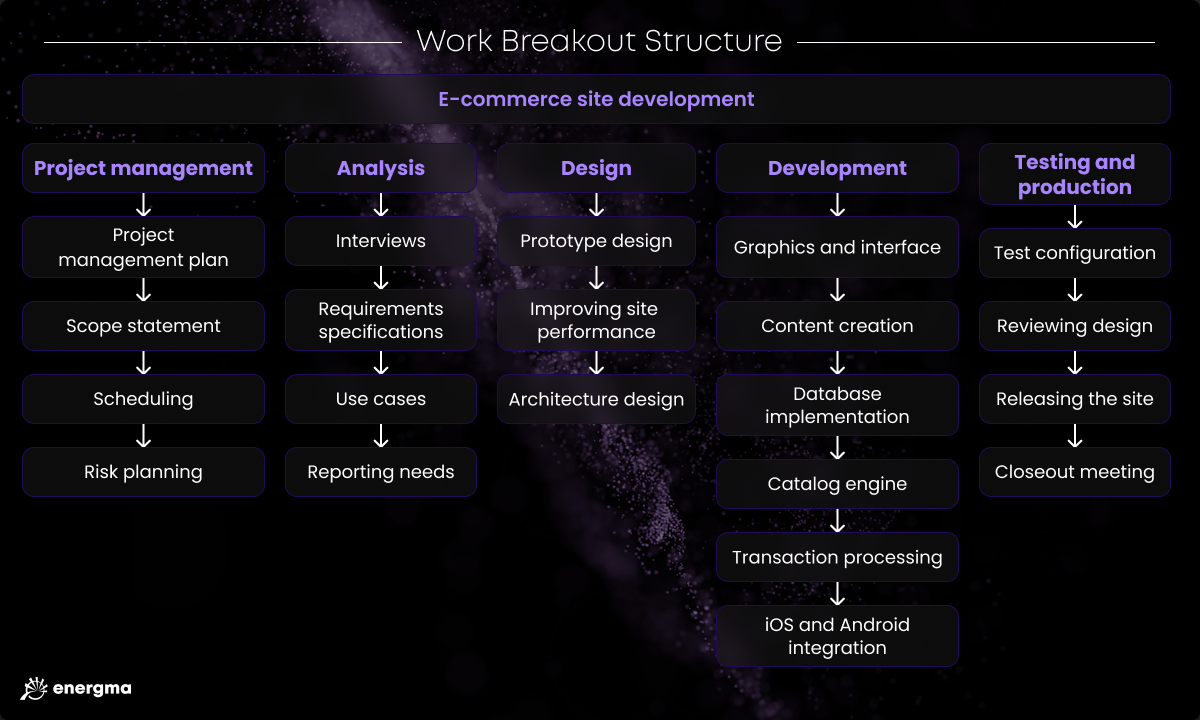
#6 Create a Work Breakdown Structure (WBS)
Breaking a project into smaller, manageable tasks is a critical step for cost estimation and planning. A Work Breakdown Structure (WBS) organizes the project into detailed components, letting you assign ownership, timelines, and resources without guesswork.
The right level of detail defines the usefulness of your WBS. Teams can create anything from a high-level map (like the one shown below) to a granular breakdown of tasks into a detailed list of sub-tasks. When in doubt, aim for balance. Too vague and you’ll miss dependencies, too granular and you’ll bloat estimates.
Your WBS should:
Be built with your development team. The people actually doing the work must be involved or it will not be accurate.
Help project managers and developers shape timelines and spot risks early.
Track progress and flag tasks before they run over budget.
Example: Instead of listing “Develop login system,” break it down to “Design user schema,” “Implement authentication,” “Add password recovery.” Details create clarity, and keep your budget on track.
Software Development Cost Factors
Every software project is shaped by the variables beneath the surface that can affect the overall cost. Complexity drives cost, but it’s not the only factor in play. Architecture choices, integrations, team structure, and tech stack decisions can all shift the numbers fast. Let’s take a look at the key factors that can affect the cost of your software development project.
Research and Planning
Regardless of how complex your product is, research is going to define exactly what you’re building and how. Market validation, tech stack selection, competitor analysis, and architecture mapping all take time and expertise, which translates directly into cost. The more you dig, the more accurate (and expensive) your estimate becomes.
Technology Choices
Technology choices directly influence your development cost. Each stack comes with the price of maintenance, scaling, and team readiness to use the technology.
Open-source tools can slash upfront costs, but you’ll pay in maintenance and dependency management. Similarly, off-the-shelf solutions speed up delivery, but licensing and lock-in must be taken into consideration as well.
Complexity of the Project
It may seem obvious, but complex software requires more time and resources to develop. It involves intricate coding, heavier testing, tighter security and more complex user interface design.
The complexity is shaped by both functional and non-functional requirements. Nail both sets down and you’ll see the true weight of your build.
UI/UX Requirements
UI/UX scope can be a major cost factor, involving:
User research
User persona development
User journey maps and stories creation
Building wireframes and clickable prototypes
You should properly scope this out if you want to estimate project cost accurately.
Hiring Model
Consider who will be supporting the development of your software product. Will you be working with an in-house team, freelance developers you hire and manage, or a full-service dedicated development team? Choose your model deliberately as wrong structure burns money through inefficiency.
Development Team Location
If you’re outsourcing your development project, consider the location of the software development company or freelancers you hire. Generally, we can divide software developer locations into four categories:
Asia/India ($25-40/hr): Lowest rates, wide talent pool. However, you may find timezone friction, communication gaps, and variable code quality. Best for short, well-scoped builds.
Eastern Europe ($35-60/hr): Has become a popular region for long-term partnerships and complex systems due to the strong balance between cost, technical depth, and reliability.
Western Europe ($60-80/hr): More expensive than Eastern Europe due to higher labor costs, but there is strong overlap in work culture and communication standards.
US ($80-120+/hr): One of the most expensive places in the world for software development. However, it’s top-tier quality, compliance, and speed. Ideal for enterprise-grade delivery and tight collaboration.
While developer rates vary sharply by region, pick the geography that matches your priorities, not just your price point.
Support and Maintenance
Performance monitoring, on-call support, and technical improvements all add ongoing costs. When comparing vendor quotes, ask what’s included after launch. Ignoring support costs is how projects quietly double in price six months later.
Average Cost of Software Development
Low Complexity Software
Limited features
Simple UI
No third-party integrations
Single-platform optimization
Time frame: 1-2 months
Cost: $5k – $15k USD
Medium Complexity Software
Robust feature set
Custom UI/UX
Third-party integrations possible
Multiple platform optimization
Time frame: 2-6 months
Cost: $15k – $45k USD
High Complexity Software
Multiple complex features
Custom UI/UX
Third-party integrations likely
Enterprise-level requirements
Multiple platform optimization
Time frame: 6+ months
Cost: $50k+ USD
These are ballpark figures that vary by project scope, technology stack, and customization depth. The goal isn’t to predict the exact dollar amount, but to set expectations and plan for range.
Tips to Prevent Budget Overruns
Software development projects can derail fast, so it’s no wonder that many companies are looking for ways to estimate their budget accurately and to prevent budget overruns throughout the project. To keep your budget under control:
● Align early on scope: The fastest way to go over budget is by changing scope midstream. As much as possible, get all stakeholders and management on the same page before development begins.
● Consult an experienced vendor: A seasoned engineering partner will be able to use their years of experience in the industry to help you hone in on a more accurate project estimate.
● Plan for the unexpected: Include contingencies in the budget for any unexpected costs or delays.
● Define milestones: Break the project into smaller deliverables and milestones. Each should have a target, an owner, and measurable outcome.
● Monitor progress and costs: Track and review change requests weekly. Adjust estimates as new information surfaces.
● Use proven development strategies: Proven methodologies like Agile, Scrum, and DevOps can increase efficiency and reduce costs.
Conclusion
If you need a precise estimate, reach out. Energma’s engineers and project leads help teams design budgets that help reduce costs, speed up delivery, and give you the flexibility to adapt as your product evolves.