• What we do

    full-cycleFull Cycle Developmentstaff-augmentationIT Staff Augmentationai-developmentAI DevelopmententerpriseEnterprise Application Developmenttech-consultingTechnology Consulting
    Service Preview
    full-cycle
    Service preview

    Full Cycle Development

    End-to-end software development from concept to deployment, using cutting-edge technologies and best practices.

    Learn more
  • Blog
    Energma's Local LLM Setup in 20 MinutesAutomate your workflow with Atlassian and Claude CLIClaude Code: Installation & Basic Usage GuideContainerizing Node.js Microservices with Docker & KubernetesTop 15 KPIs That Keep Software Project on Track
    Company News
    ICAOTA 2026: The First International Conference on Advances in Operator Theory and ApplicationsOne Keypress and... Blink!Introducing ConfigMergeSDK - Modular Configurations for Scalable AppsExpanding the Frontier of Numerical Radius Inequalities for Hilbert Space OperatorsNew Generalized Numerical Radius Inequalities for Hilbert Space Operators
    Case Studies
    The New Blueprint: AI-Driven Mortgage EngagementOne Hub. Unified Fintech Control.From Static to Addictive: Content Exchange PlatformMeetings, Transformed: Gesture-Led WorkspaceOperations, Synced: End-to-End Live Process Monitoring
    Featured resource
    Featured article

    The New Blueprint: AI-Driven Mortgage Engagement

    Rebuilt outdated systems and UX to boost performance, accelerate feature delivery, and simplify integrations for a leading real estate tech platform.

    Read more
    See all case studies
  • About Us
  • FAQ
Get Started

We deliver advantage beyond features.
What will you ship?

Get Started
  • Full Cycle Development
  • IT Staff Augmentation
  • AI Development
  • Enterprise Application Development
  • Technology Consulting
  • Case Studies
  • Blog
  • Company news
  • About
  • FAQ
  • Contact Us

Follow Us

Site MapTerms of UsePrivacy Policy
© Energmа 2026. All rights reserved.
Železnička 94, 11300 Smederevo, Serbia

Cookie Preferences

We use cookies to enhance your browsing experience, serve personalized content, and analyze our traffic. Choose your preferences below.

Essential Cookies

These cookies are necessary for the website to function properly. It is accepted by default.

Always On

Analytics Cookies

These cookies help us understand how visitors interact with our website by collecting and reporting information anonymously.

Marketing Cookies

These cookies are used to track visitors across websites to display relevant advertisements.

Back to blog
← Back to blog
Article thumbnail

What Happens When Your AI Stack Stops Leaking Data and Budget? Energma's Local LLM Setup in 20 Minutes

An average development team using cloud-hosted AI APIs spends between $30,000 and $150,000 annually on tokens alone. Add data governance risk, compliance overhead, and the latency that compounds when your AI calls have to round-trip through an external server, and it becomes a serious tax on your infrastructure budget.

Local LLMs eliminate all three problems simultaneously. You run the model on your own hardware. Data stays inside your perimeter. Your engineers ship faster.

Quick Summary

  • Cloud AI APIs cost teams between $30,000 and $150,000 annually in token fees alone - before factoring in compliance overhead and governance risk. Local LLMs eliminate that cost structure entirely.
  • Owned end-to-end or third-party dependent? Going local means your model has zero visibility into your proprietary codebase, leaving you with full control of the engineering environment.
  • The entire setup runs on two tools - Ollama for model management and OpenCode for AI-assisted development. It takes under twenty minutes to configure and it works with any open-source model.
  • The teams pulling ahead aren't using more AI. They're using it more deliberately with full control over where it runs.

Where Your Intelligence Lives Is a Strategic Choice

What you're actually choosing when you go local is bigger than cost reduction. You're making a structural decision about where your intelligence layer lives. Local LLMs mean your model has zero visibility into your proprietary codebase. Performance stays stable regardless of silent upstream model updates. Your engineering environment becomes owned end to end, with no third-party dependencies inside your development loop.
Two Tools, Twenty Minutes

This guide shows the exact setup we use at Energma for a fully private AI development environment that costs nothing to run after setup and works entirely offline.

Tools & Download Links:

  • Ollama - https://ollama.com/
  • OpenCode - https://opencode.ai/

Ollama: Your Local Model Manager

Install once. Run any open-source LLM on your own hardware - no cloud required. Ollama acts as a package manager for large language models. It simplifies downloading models from its library, running them locally on your CPU or GPU (minimum 8 GB RAM), and serving them through a clean local API.

Installation

Run the following command to install Ollama:

1curl -fsSL https://ollama.com/install.sh | sh

Verification

After installation, verify that Ollama is installed correctly:

1ollama --version

If installed successfully, the command will return the installed version number.

Choosing a Model

Next, choose an LLM compatible with Ollama from its model library. For purposes of this guide we are going to use lightweight Qwen3:8b version which is downloadable here.qwen3:8b

Download the Model

Download the model by running:

1ollama pull qwen3:8b

Verify the Model is Installed

To confirm the model is available locally, run:

1ollama list

The output should look similar to:

1NAME ID SIZE MODIFIED
2qwen3:8b xxxxxxxxxxxx 5.2 GB 5 minutes ago

OpenCode: The AI Coding Assistant That Never Leaves Your Machine

OpenCode is an AI-powered coding assistant that runs directly in your terminal. It works like a pair programmer, understanding your entire codebase to generate code, explain existing logic, refactor cleanly, and answer project-specific questions. It uses local LLMs, meaning no internet connection is required once set up.

Installation

Run the following command to install OpenCode:

1curl -fsSL https://opencode.ai/install | bash

Verify Installation

1opencode --version

The version number will be displayed if installation was successful.

Project Setup

In our local project inside a root directory add .opencode folder.

Now we need to create configuration file for OpenCode that tells it how to connect to a locally running LLM through Ollama.

opencode.json example:

1{
2 "$schema": "https://opencode.ai/config.json",
3 "provider": {
4 "ollama": {
5 "npm": "@ai-sdk/openai-compatible",
6 "name": "Ollama (local)",
7 "options": {
8 "baseURL": "http://localhost:11434/v1"
9 },
10 "models": {
11 "qwen3:8b": {
12 "name": "qwen3:8b"
13 }
14 }
15 }
16 }
17}

Note: Ollama is running on localhost:11434 by default.

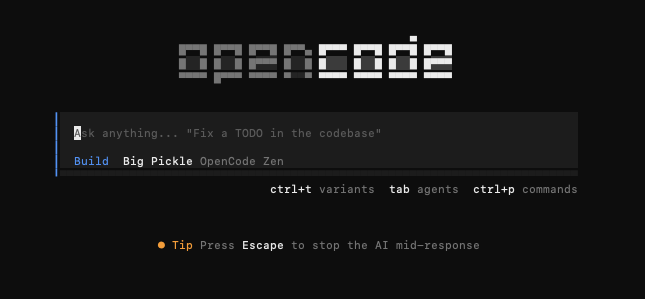
In local project directory inside terminal type opencode

This will open up opencode prompt interface.

Blog image

Bringing It Together: OpenCode Meets Ollama

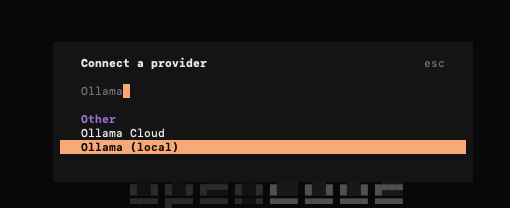
In the OpenCode interface, type /connect. This opens the provider selection modal. Type ollama and choose Ollama (local) provider

Blog image

It will ask you to enter API Key. Since Ollama runs locally, no real API key is required.

Type ollama-local as an API key.

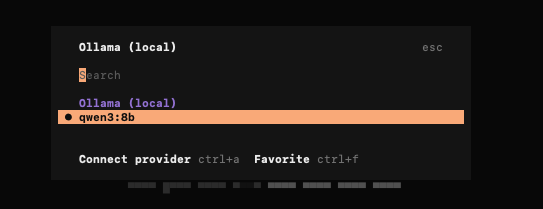
Select LLM model from interface, choose our qwen3:8b like so:

Blog image

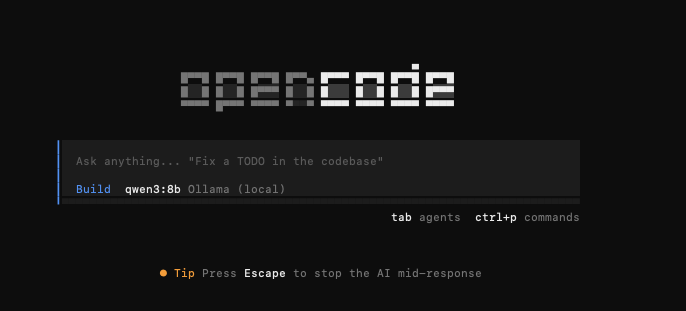
After those steps you will be returned to prompt interface where you can see default language model is now changed to qwen3:8b.

Blog image

The setup is now complete and the stack is running.

What You Build Next Is the Real Decision

Local LLMs are one piece of a broader shift in how high-performance engineering teams are architecting their AI stack. The engineers who thrive in the next three years won't be the ones who use AI the most. They'll be the ones who understand where to put it, how to control it, and how to build systems around it that don't create new dependencies and technical debt.

If your current AI tooling creates data risk, unpredictable costs, or latency you can't control - the problem is already costing you. The question isn't whether to fix it. The question is whether you fix it with a setup guide or with a proper architectural review. That's the conversation we have with engineering leaders every week.[Book yours here →]

Table of Contents

  • Where Your Intelligence Lives Is a Strategic Choice
  • Two Tools, Twenty Minutes
  • Ollama: Your Local Model Manager
    • Installation
    • Verification
    • Choosing a Model
    • Download the Model
    • Verify the Model is Installed
  • OpenCode: The AI Coding Assistant That Never Leaves Your Machine
    • Installation
    • Verify Installation
    • Project Setup
    • Bringing It Together: OpenCode Meets Ollama
  • What You Build Next Is the Real Decision